
Predict, evaluate, and reflect
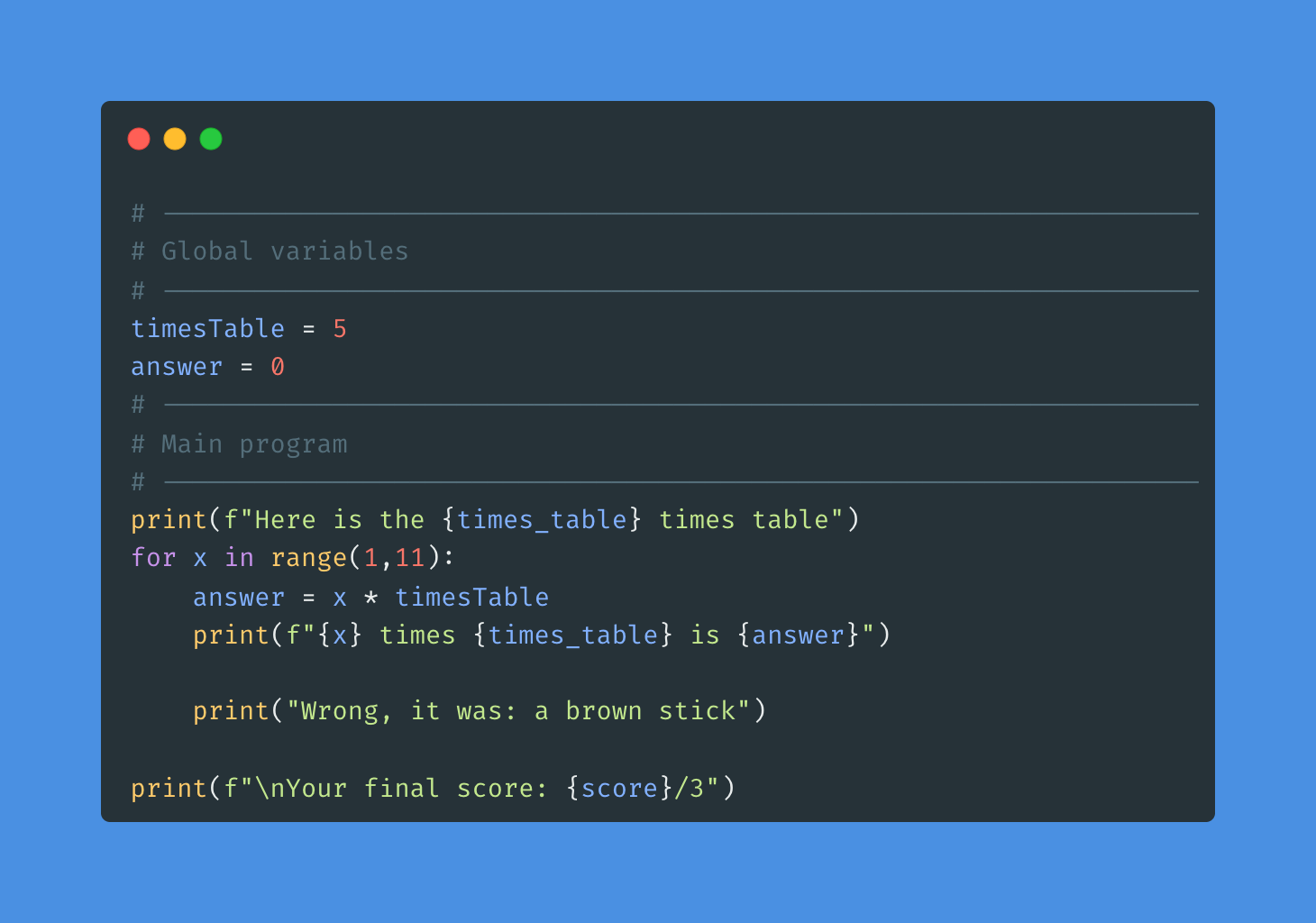
What does the program do?
(What happens when it runs?)
What could make it better?
(Is there anything you would change or add?)
Why was it made like this?
(What do you think the programmer wanted it to do?)
Why might the program not work?
(What could stop it from running properly?)
What kind of mistake or error could happen?
(Is it a typing error, logic error, or input problem?)

Investigate the program features
| Focus Area | Question | Answers |
|---|---|---|
| Identify parts | What variables can you find in this program? (What are the names of the values that store data?) | |
| Understand process | What does the for x in range(1,11): line do? (How many times will the loop run?) |
|
| Explore change | What would happen if you changed the range to (1,6) instead of (1,11)? (How would that affect the output?) | |
| Output formatting | What does the f in print(f"...") do? (How does it help display variable values in the text?) |
|
| Debug | What kind of error might happen if you removed answer = 0 at the start? (Would the program still run correctly? Why or why not?) |
|
| Predict & Reason | What would happen if timesTable was a word instead of a number? (Think about what Python would do when it tries to multiply.) |

Improve and extend the Times Table Generator
| Focus | Task | ✓ |
|---|---|---|
| Change your previous program so that… | The user can choose which times table to display. (Use input() to let them type a number.) |
|
| What happens when you alter your program so that…? | Change the values in range so the generator outputs from 1 to 12. |
|
| Add to the program so that… | It shows the total sum of all answers at the end. (Add a variable to track the running total.) | |
| Improve your program. | Add functionality for the user to enter how far the times table should go. 1. Create a variable called maxValue2. Assign a value to maxValue through user input3. Add a message explaining what to enter 4. Replace 13 in range(1, maxValue + 1) with maxValue5. Test your code |

Times Table Generator
You will create a quiz program that tests a player’s knowledge of their times tables.
| Steps | Focus / Skill | Instructions |
|---|---|---|
| 1 | Create global variables | Make a variable for the times table number (timesTable) and how far to go (maxValue). |
| 2 | Output text | Print a welcome message and explain what the program will do. |
| 3 | Create inputs | Create inputs for the times table number and how far to go. |
| 4 | Use a for loop | Repeat each question for the chosen range of numbers. |
| 5 | Take input inside the loop | Ask the user for their answer each time. |
| 6 | Use variables in calculations | Work out the correct answer. |
| 7 | Use an if statement | Check if the user’s answer is correct or incorrect. |
| 8 | (Extension) Use a score variable | Add a score counter to track correct answers. |
| 9 | Output final score | At the end, show how many answers were correct. |
| 10 | Output a progress message | Add feedback based on score (e.g., Perfect score!, Great job!, or Keep practising!). |
JUMP123 Assessment
| Level 1 | Level 2 | Level 3 |
|---|---|---|
 |
 |
 |
The program uses basic code we’ve learned before. Some parts work, but there are mistakes or things missing. It doesn’t fully do what it should yet. |
The program has the main idea working (like a loop, input, or if statement). It mostly works, but might still have a few small errors or need clearer output. |
The program works perfectly and does everything the task asked for. It’s clear, correct, and easy to use — maybe even has extra features or nice touches. |